


Account Settings
The Account Settings page lets you manage your profile information, configure newsletter preferences, view your current subscription status, and access billing management. All account-related actions are available in one place.
Accessing Account Settings
Navigate to Settings in the top bar. The page is divided into three sections: Account Details, Newsletter Settings, and Subscription.
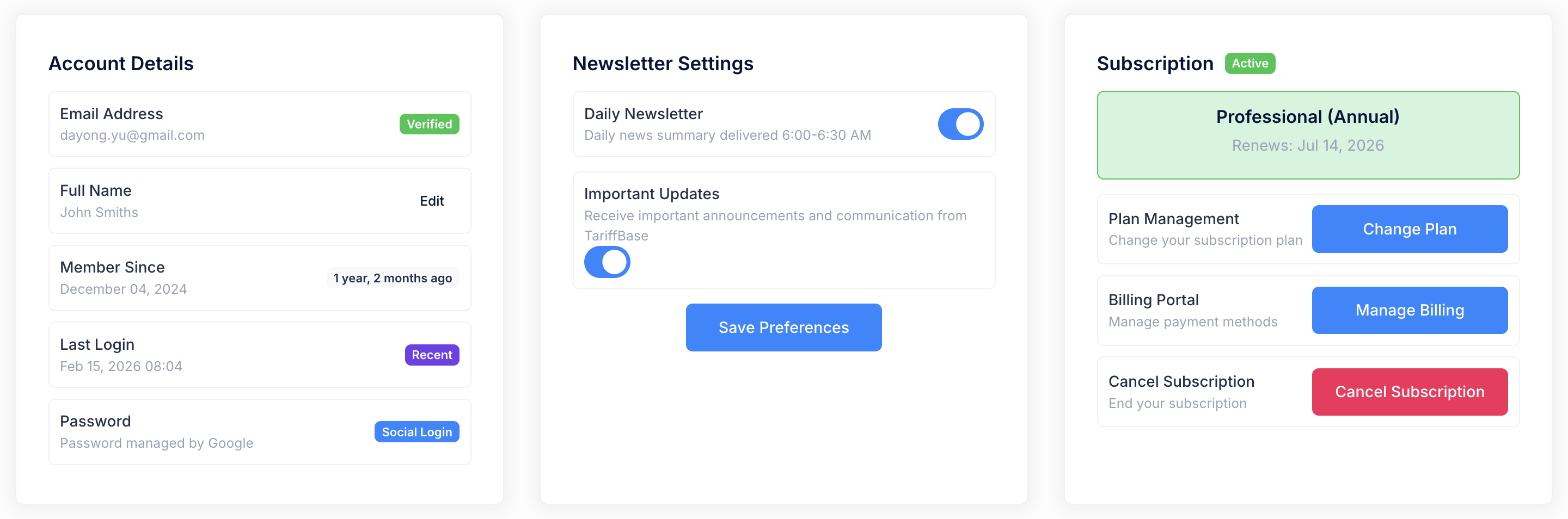
Account Details
The Account Details section displays your profile information and account activity:
| Field | Description |
|---|---|
| Email Address | Your registered email address, shown with a Verified badge |
| Full Name | Your display name. Click Edit to update your first and last name |
| Member Since | The date you created your account, with a relative time badge (e.g. "1 year, 2 months ago") |
| Last Login | The date and time of your most recent login, with a Recent badge |
| Password | For standard accounts, click Change to update your password. For social login accounts, a Social Login badge is displayed instead |
Updating Your Name
- Click the Edit button next to your name.
- Enter your updated first name and last name in the form.
- Click Save to confirm the change.
Changing Your Password
- Click the Change button next to the Password field.
- Enter your current password and your new password (twice for confirmation).
- Click Save to update your password.
Note: If you signed in using a social login provider (e.g. Google), your password is managed by that provider and cannot be changed from this page.
Changing Your Email
For security reasons, your email address cannot be changed directly through the settings page. If you need to update your email, please contact support@tariffbase.io for assistance.
Newsletter Settings
The Newsletter Settings section lets you manage your email communication preferences. Two toggles are available:
| Setting | Description |
|---|---|
| Daily Newsletter | Daily news summary delivered 6:00-6:30 AM |
| Important Updates | Receive important announcements and communication from TariffBase |
To update your preferences:
- Toggle each setting on or off as desired.
- Click Save Preferences to apply your changes.
You can also unsubscribe using the link at the bottom of any newsletter email.
Subscription
The Subscription section shows your current plan and provides access to plan management, billing, and cancellation.
Plan Overview
At the top of the section, a highlighted card displays:
- Plan Name -- The name of your active subscription plan (e.g. "Professional (Annual)")
- Status -- Indicated by a green Active badge, or an Ending Soon badge if cancellation is pending
- Renewal / End Date -- The date when your subscription will renew, or the date when it will end if cancelled
Available Actions
| Action | Description |
|---|---|
| Change Plan | View available plans and switch to a different one. Plan switching follows specific rules (see Subscription & Payment for details) |
| Manage Billing | Opens a secure billing portal powered by Stripe where you can update your payment method, view billing history, and download invoices |
| Cancel Subscription | Cancel your subscription. You will be asked to confirm via a modal dialog. After cancellation, you retain full access until the end of your current billing period |
Note: The Manage Billing option is not available for Free Trial subscriptions. If your subscription is already cancelled, the cancel button will be disabled and show "Already Cancelled" with the end date.
Security: TariffBase does not store your payment details directly. All sensitive payment information is handled exclusively by Stripe's PCI-compliant infrastructure.
Important Notes
- One active subscription at a time. TariffBase enforces a single active subscription per account to prevent billing conflicts.
- Cancellation is not immediate. When you cancel, your subscription remains active until the end of the current billing cycle. You will not be charged again after cancellation.
- Plan switching rules apply. Not all plan transitions are allowed. For example, you cannot downgrade from Professional to a Standard plan. See the Subscription & Payment page for the full switching rules.
- Free trial is one-time only. Each account can activate the free trial once. After the trial expires, you must choose a paid plan to continue using the platform.