


Regulatory Tracker
The Regulatory Tracker is a structured database and interactive timeline of tariff actions, retaliations, and policy changes implemented by governments around the world. It provides a clear, chronological view of trade policy developments with detailed information about each action -- including effective dates, affected products, trade values, and official source references.
Why Use the Regulatory Tracker?
In today's volatile trade environment, tariff actions can change rapidly. The Regulatory Tracker helps you:
- Track the sequence of events in trade disputes (e.g., US-China tariff escalation)
- Understand what happened and when -- effective dates, rate changes, and coverage
- Assess the scope of impact -- which products and trade values are affected
- Access official sources -- links to government notices and legal references
Unlike news articles that report events as they happen, the Regulatory Tracker provides structured, fact-based records that you can reference over time.
Accessing the Regulatory Tracker
- Navigate to Regulatory Tracker in the left sidebar under Tariff Intelligence.
- The page displays two views:
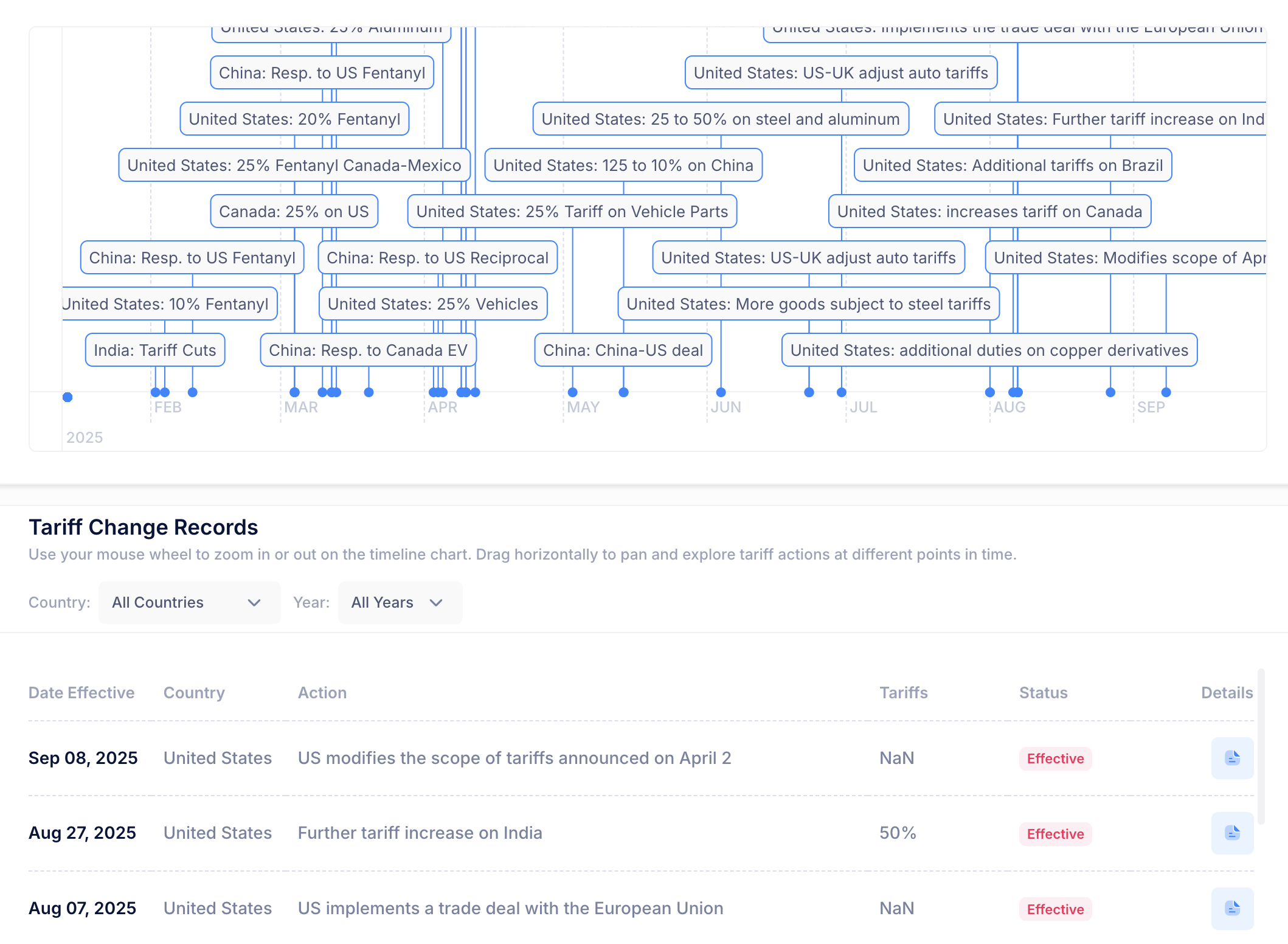
- An interactive Timeline at the top
- A detailed List View below
Using the Timeline
The timeline provides a visual overview of major tariff actions arranged chronologically:
- Each label on the timeline represents a significant trade action or policy change.
- Click on any label to automatically scroll to and highlight the corresponding entry in the list below.
- The timeline makes it easy to see the cadence and escalation of trade actions at a glance.
Example: Clicking on "United States: S301 China Stage 3 Updated" will highlight that specific entry in the list view, showing all its details.
[Screenshot: Timeline with labeled events, one highlighted/selected]
Understanding the List View
The list provides detailed information about each tariff action. Each entry includes:
| Field | Description |
|---|---|
| Date Effective | The date when the action takes effect |
| Country | The country implementing the tariff action |
| Action | A brief description of the measure (e.g., Section 301 China Stage 4A) |
| Tariffs | The tariff rates associated with the action (e.g., 25%, 7.5%) |
| Status | The current status of the action: Effective, Suspended, Modified, etc. |
Viewing Detailed Information
For a deeper look at any specific action:
- Click the Show Details button on the corresponding row.
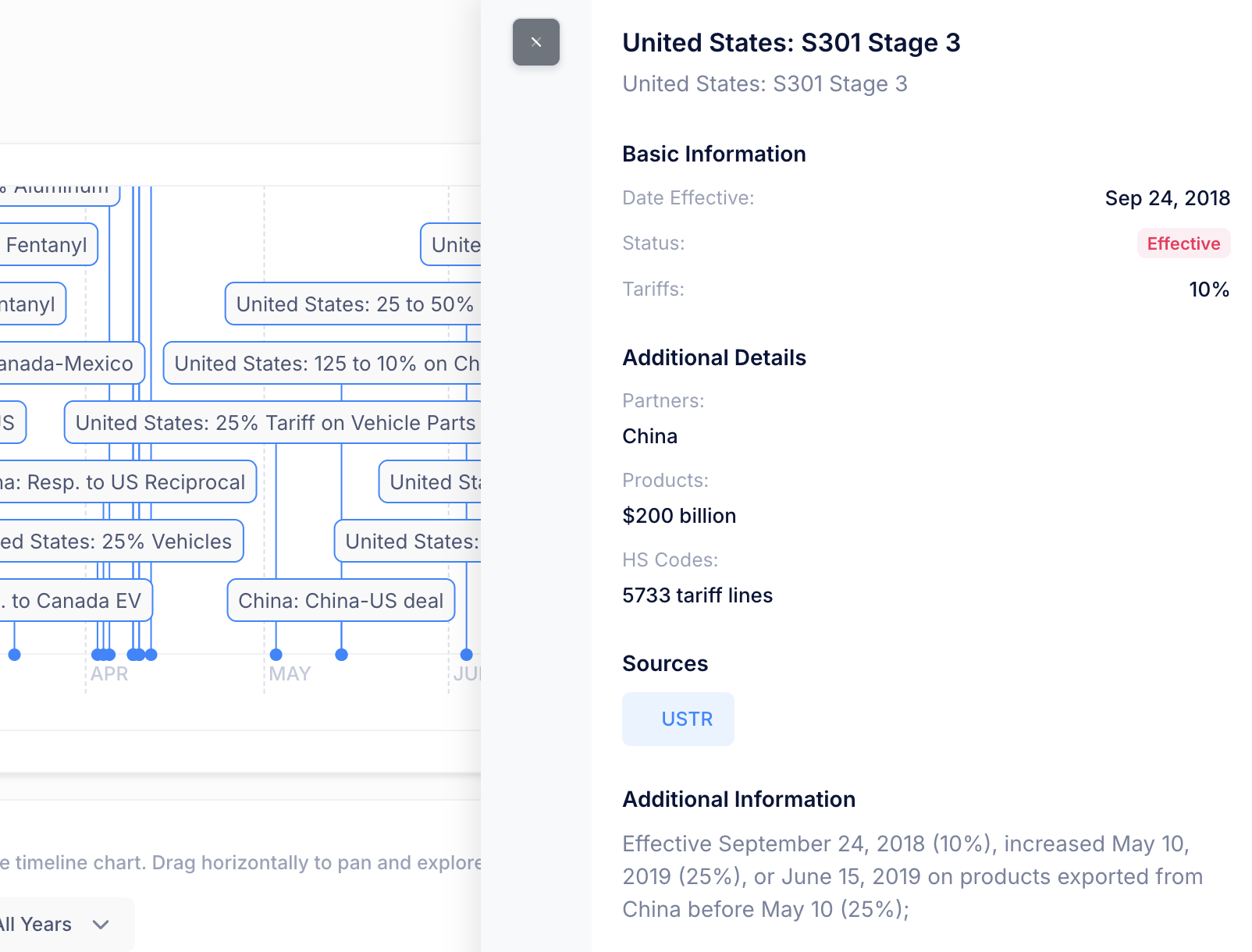
- The expanded view displays:
| Detail | Description |
|---|---|
| Action Short | Concise name for the regulatory action |
| Products | The trade value or product scope affected (e.g., $126 billion) |
| Partners | Countries or regions targeted by the action |
| HS Codes | Number of tariff lines covered by the action |
| Source | Links to official government notices, Federal Register entries, or other legal references |
| Additional Info | Clarifications such as rate adjustments, effective date modifications, or exemptions |
Example entry:
- Action: Section 301 China Stage 4A Updated
- Products: $126 billion in trade value
- Partners: China
- HS Codes: 3,229 tariff lines
- Status: Effective
- Additional Info: Originally effective September 1, 2019 at 15%, reduced to 7.5% effective February 14, 2020.
Practical Use Cases
| Scenario | How the Tracker Helps |
|---|---|
| Understanding duty stacking | See all active tariff actions for a country pair to understand why multiple additional duties apply |
| Tracking trade war escalation | Follow the chronological sequence of retaliatory actions between countries |
| Compliance review | Verify which tariff measures are currently Effective vs. Suspended for your products |
| Client briefing | Use the structured data to prepare clear summaries of regulatory developments for stakeholders |
| Historical research | Review past actions to understand the evolution of trade policy over time |
Connecting the Dots
The Regulatory Tracker works best when used alongside other TariffBase features:
- Tariff Search -- After identifying an active tariff action in the Tracker, use Search to see the exact rate applied to your specific product and trade corridor.
- Tariff News -- Read the latest news articles about actions that appear in the Tracker for additional context and analysis.
- Tariff Schedule -- Browse the full schedule of the affected country to see how the action fits into the broader tariff structure.
Tips for Effective Use
- Use the Timeline for overview, the List for detail. The timeline gives you the big picture; click through to the list for specifics.
- Pay attention to Status. Actions marked as Suspended or Modified may have different rates than originally announced.
- Check the Source links. For compliance or legal purposes, always refer to the official source documents linked in each entry.
- Review Additional Info carefully. Rate adjustments and date modifications are common in trade policy -- the details matter.