


Quickstart Guide
This guide walks you through the essential steps to get started with TariffBase -- from creating your account to running your first tariff lookup. You can be up and running in under five minutes.
Step 1: Create Your Account
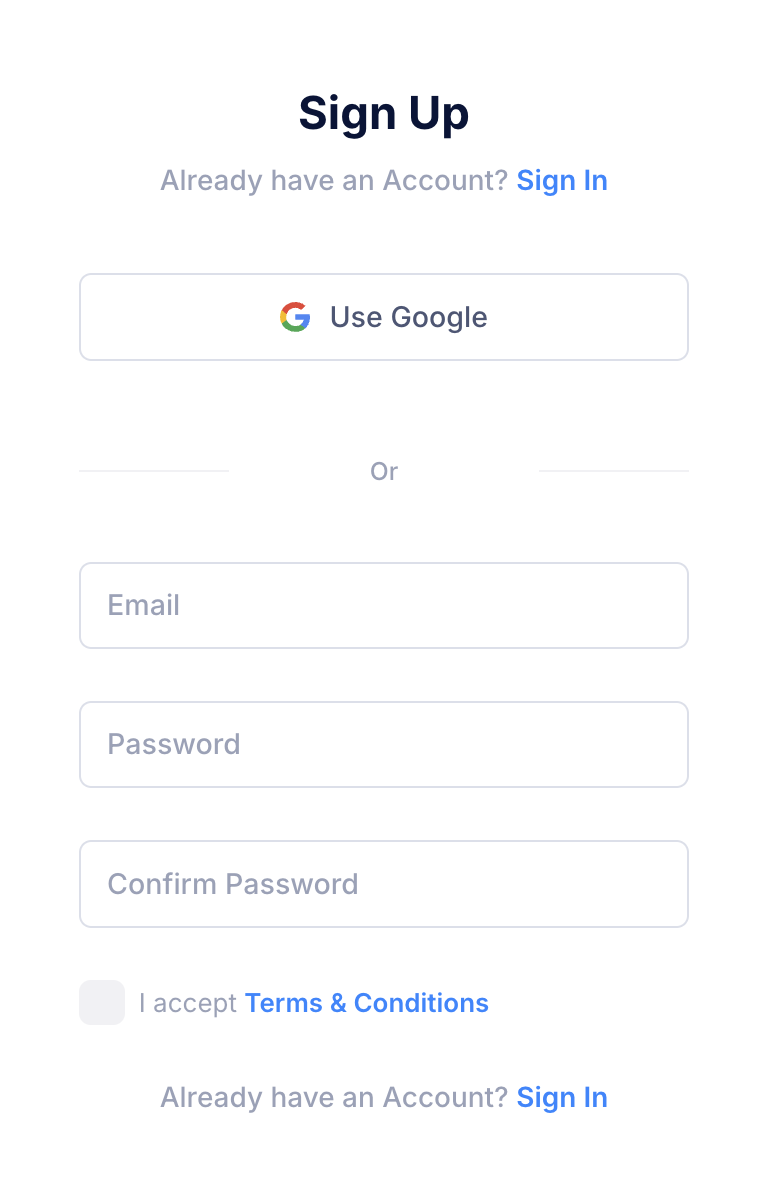
- Go to tariffbase.io and click Sign Up.
- Choose one of the following sign-up methods:
- Email and password: Enter your email address and create a password, then check your inbox for a verification email and click the confirmation link.
- Google account: Click Sign in with Google and follow the prompts to authenticate with your Google account.
- You will be redirected to the TariffBase dashboard.
Step 2: Activate Your Free Trial
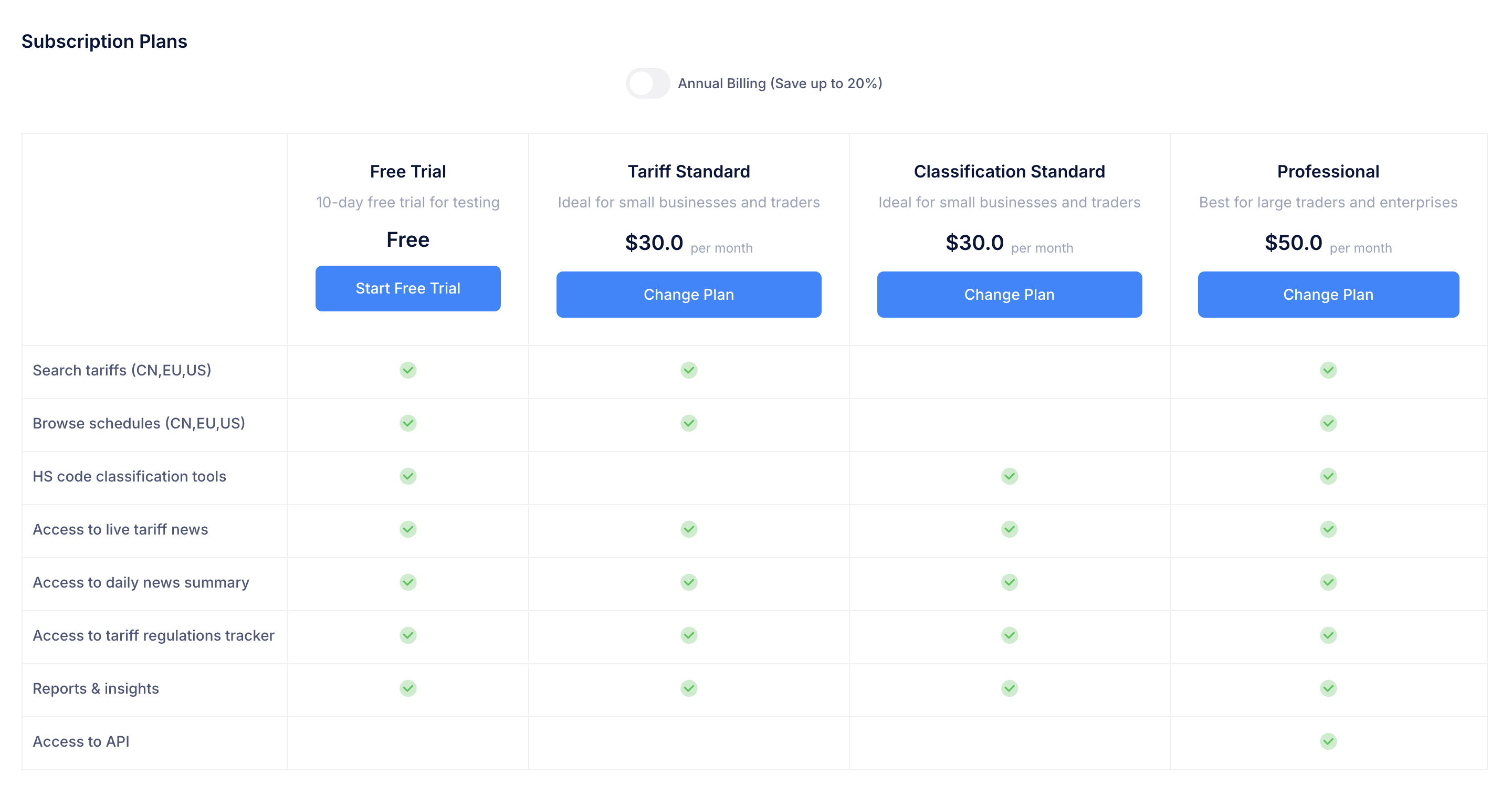
All new users receive a 10-day free trial with access to core platform features at no cost. No credit card is required.
To activate your trial:
- From the dashboard, click any feature in the sidebar (e.g., Search or Schedule).
- You will see the Subscription Plans page.
- Click Start Free Trial to activate your trial instantly.
During the free trial, you can access:
- Tariff Search -- look up customs duty rates for the US, EU, and China
- Schedule Browser -- browse complete tariff schedules
- Tariff News -- read the latest trade and tariff developments
Step 3: Run Your First Tariff Search
The Tariff Search tool is the most commonly used feature on the platform. Here is how to perform your first lookup:
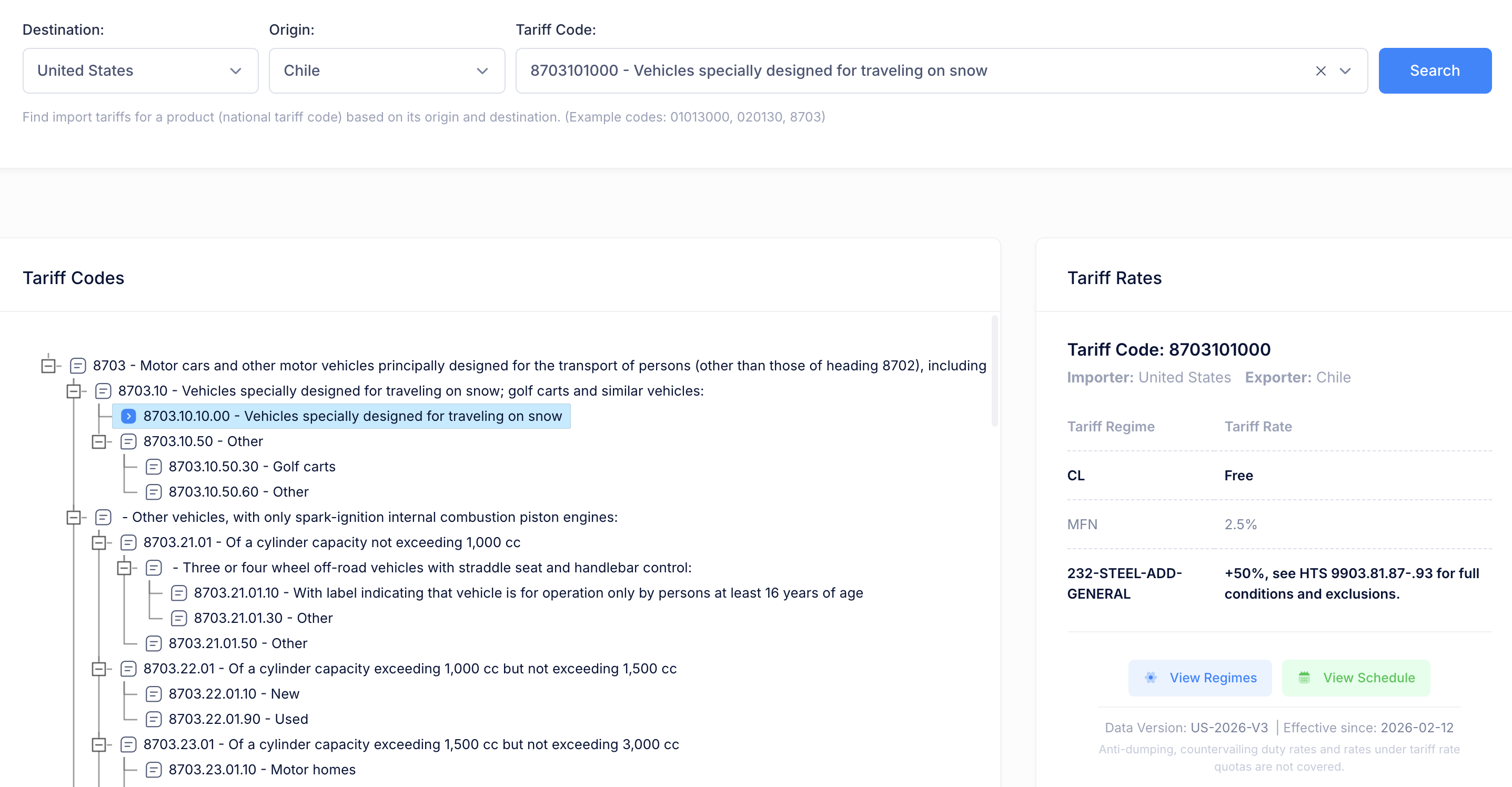
- Click Search in the left sidebar under Tariff Tools.
- Select a Destination country (the importing market) -- e.g., United States.
- Select an Origin country (where the goods ship from) -- e.g., China.
- Enter a Tariff Code (HS code or national code) -- e.g.,
8703for motor vehicles. - Click Search.
The results will display:
- A hierarchical view of matching tariff codes
- All applicable tariff rates, including MFN duties and any additional measures
- The total likely duty rate highlighted in bold
- Effective dates and last update information
Tip: If you don't know the HS code for your product, use the HS Finder tool to classify it first.
Step 4: Browse a Tariff Schedule
To explore the full tariff schedule for a country:
- Click Schedule in the left sidebar.
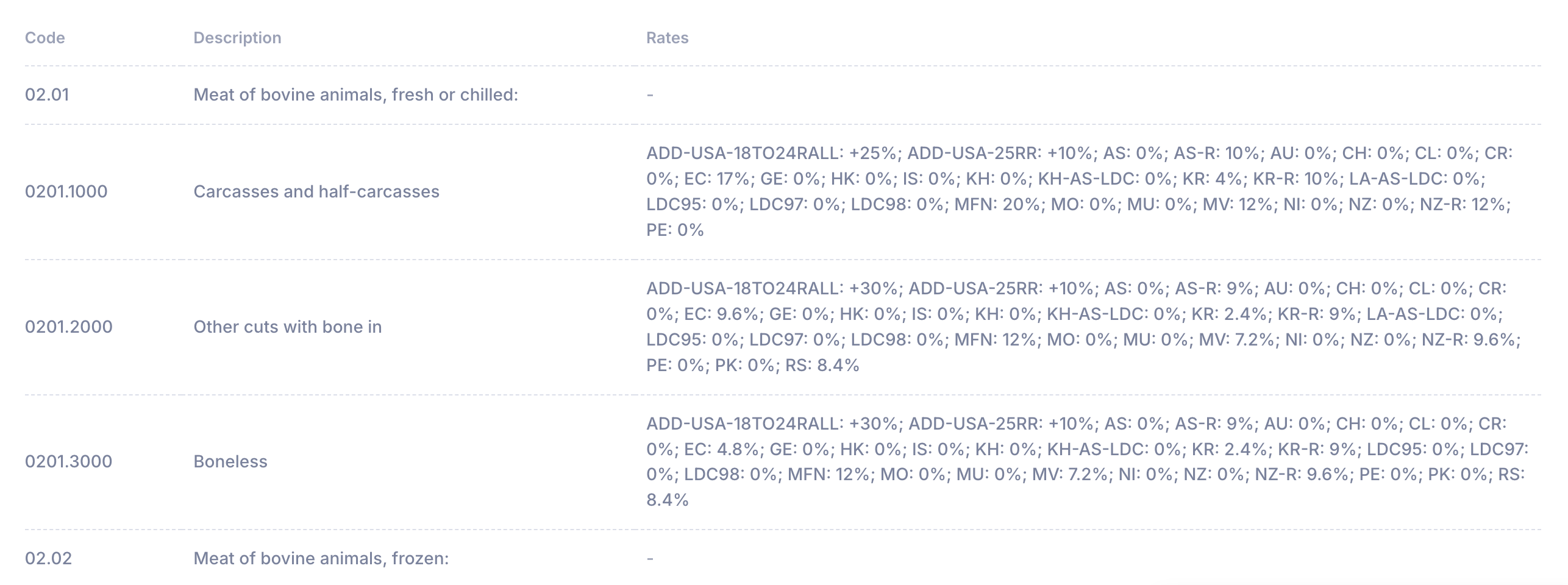
- Select a Country -- e.g., European Union.
- Select an HS Chapter -- e.g., Chapter 02: Meat and Edible Meat Offal.
- Click Show to display the schedule.
You will see a structured table with tariff codes, product descriptions, and all applicable rates and regimes.
Step 5: Classify a Product with HS Finder
If you need to determine the correct HS code for a product:
- Click HS Finder in the left sidebar.
- Enter a detailed product description -- e.g., "Tesla Model 3 electric passenger car".
- Click Identify HS Code.
The tool will generate:
- A Classification Report with the product summary, reasoning, and recommended HS code(s)
- An HS Code Hierarchy showing where the classification fits in the Harmonized System structure
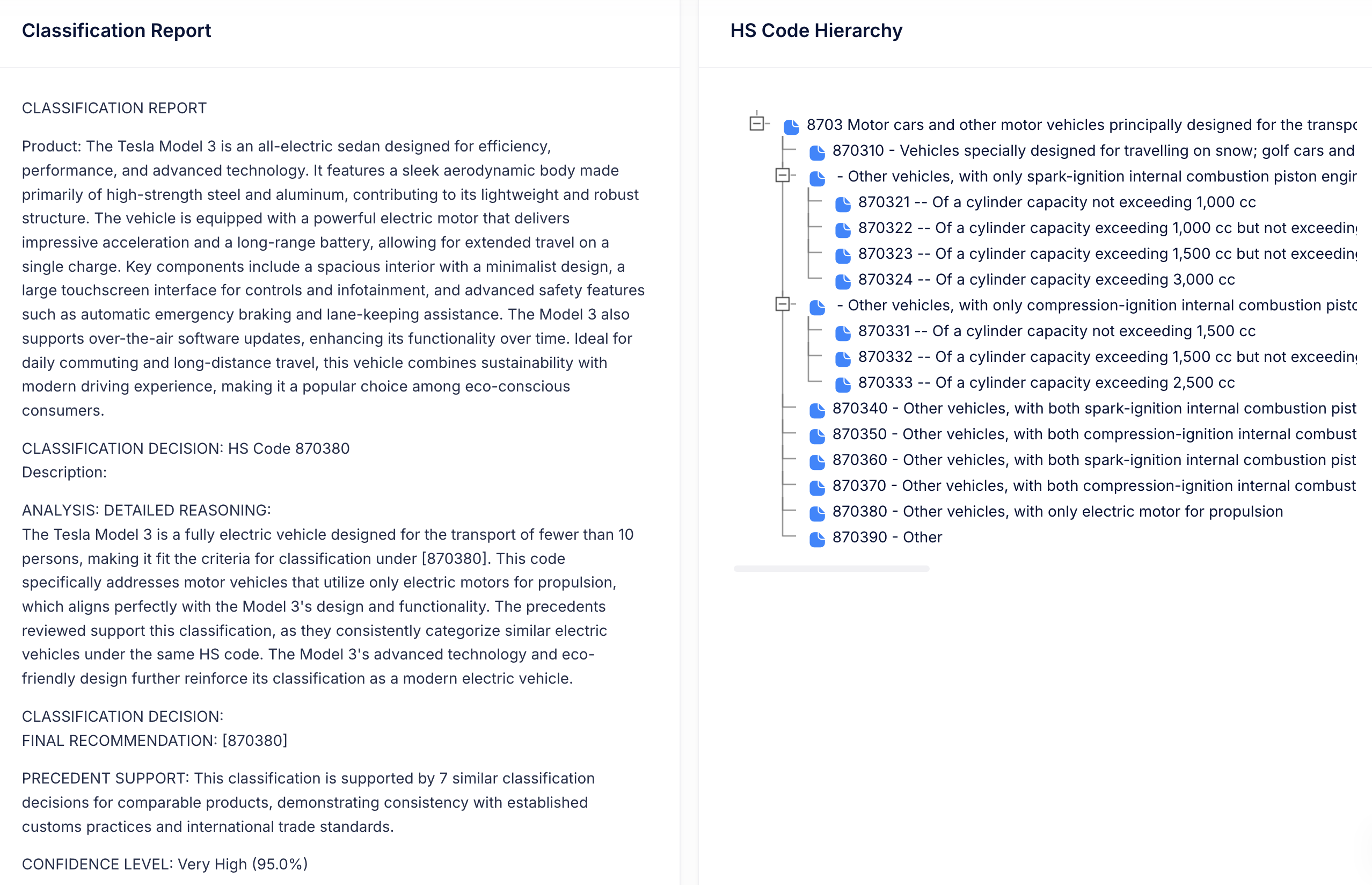
Tip: The more specific your product description, the more accurate the classification. Include material composition, intended use, and technical details when possible.
Step 6: Stay Informed with Tariff Intelligence
Tariff News
Navigate to News in the sidebar to view the latest tariff-related articles from credible sources. The feed is updated regularly and can be filtered by date, keyword, or source.
Regulatory Tracker
Navigate to Regulatory Tracker to view an interactive timeline of major tariff actions and policy changes. Click on any event to see details including affected products, trade values, and source references.
Reports & Insights
Navigate to Reports & Insights to browse expert analysis and research papers on trade policy topics. Use the search bar to find reports on specific subjects.
Step 7: Choose a Subscription Plan
When your free trial ends, choose the plan that fits your needs:
| Plan | Best For | Key Features |
|---|---|---|
| Tariff Standard | Importers and exporters who need tariff rate lookups | Tariff Search, Schedule Browser, News, Regulatory Tracker, Reports |
| Classification Standard | Businesses that need HS code classification | HS Finder, News, Regulatory Tracker, Reports |
| Professional | Teams that need full access including API | All features from both Standard plans plus API access |
All paid plans are available in monthly or annual billing. Annual plans save 20%.
To subscribe:
- Navigate to Account in the sidebar, then click Subscription.
- Review the available plans and select one.
- Complete payment securely through Stripe.
For detailed plan information, see the Subscription & Payment page.
Quick Reference
Here is a summary of the key actions you can take right away:
| Task | Where to Find It |
|---|---|
| Look up a tariff rate | Sidebar > Search |
| Browse a country's tariff schedule | Sidebar > Schedule |
| Classify a product by HS code | Sidebar > HS Finder |
| Read trade news | Sidebar > News |
| Track tariff policy changes | Sidebar > Regulatory Tracker |
| Read expert reports | Sidebar > Reports & Insights |
| Manage your subscription | Sidebar > Account |
| Access API documentation | Sidebar > API |
Next Steps
- Read the Dashboard Overview to learn about the main interface
- Explore individual tool guides under Tariff Tools and Tariff Intelligence
- Check the FAQ if you have questions
- Contact us for assistance